Why this project exists
The motivation for this project was to make the life of my parents easier. They have a well in their house, and they use it to suminister water to the house, irrigate the garden (divided in two sections) and to fill the water tank for a small green house.
In the past, they used to use manual valves to control the water flows for these four different locations.
If this wasn’t inconvient enough the valves were located in different places around the house.
Imagine the situation, every time they wanted to fill the green house water tank they had to go to the green house, open the valve, go to the previously used valve and close it and then turn on the well’s pump.
This was a very tedious process and extreamly umpractical. That is why I decided to create this project.
Design goals
For this project I had multiple design goals, some of them were related to the independent fuctionality of the controller, other to its integration with the smart home system, and finally to the overall functionality of the system.
Independent functionality goals
- Control four ball water valves.
- Integrare four water flow sensors.
- To be able to operate the valves from the controller.
- Over-the-air firmware updates.
Integration with smart home system goals
- Controllable from Home Assistant.
Overall functionality goals
- Redundant manual system in case the controller fails.
Hardware choises
In the past I have used ESPHome to create custom sensors and relay cotrollers for my projects, and I have found it to be a great tool for this purpose. It is highly integrated with Home Assistant and it is easy to program. Additionally, it offeres over-the-air firmware updates, which makes it possible for me to update the firmware of the controller without the need to physically access it, even from a remote location.
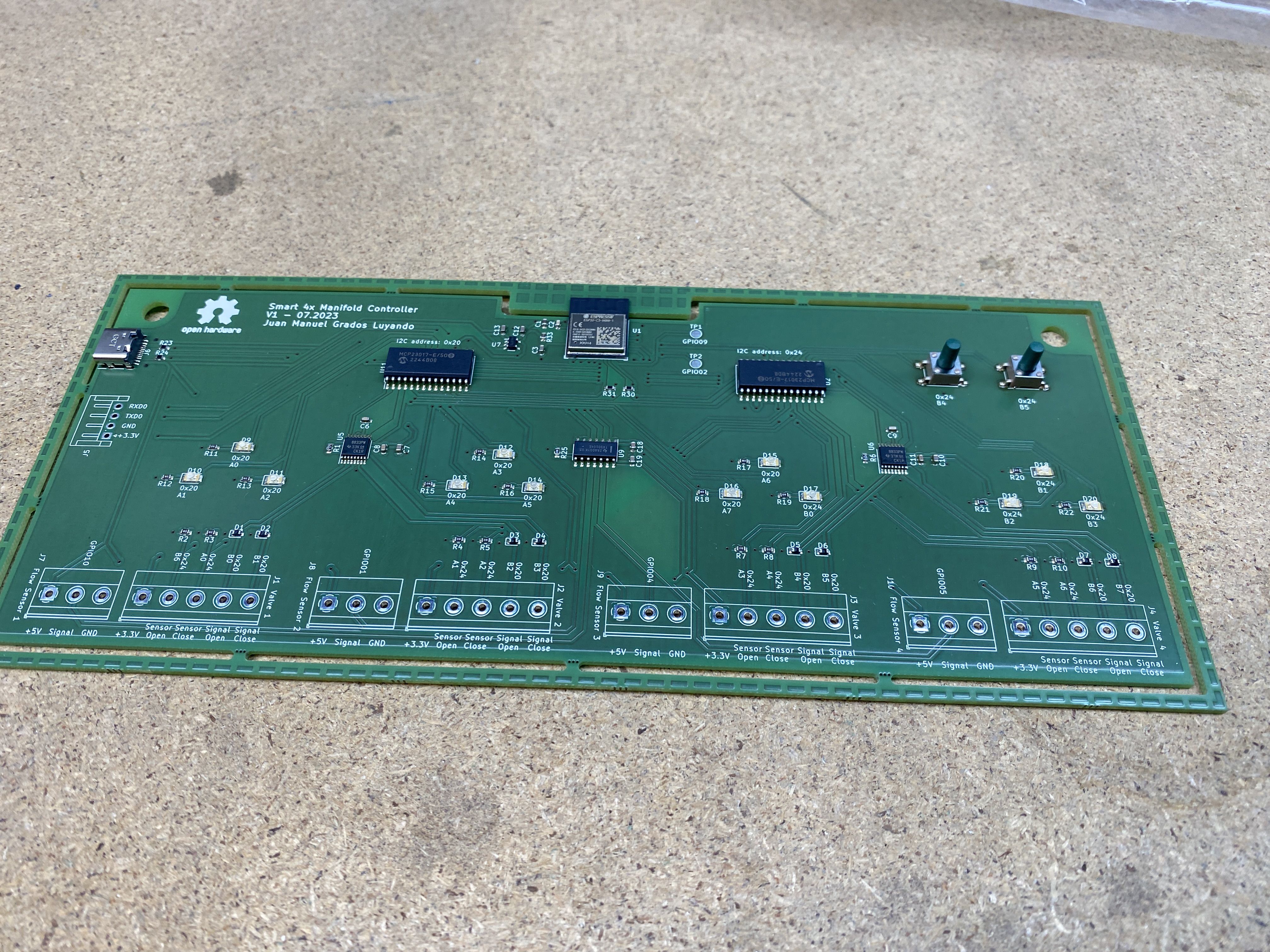
I have chosen ESP32-C3-Mini-1 as microcontroller given its low price, for being compatible with ESPHome, and for its ease of programming. One drawback of this microcontroller is its limited number of GPIOs, which is why I have chosen to use multiplexers to increase the number of GPIOs available. In concreate, I have used two MCP23017 I2C multiplexers, this multiplexer is supported by ESPHome.
Once I started this project I thought that it would be interesting to include water flow sensors in each water line to monitor water consumption. For this purpose I have chosen to use YF-B1 water flow sensors, this sensor is supported by ESPHome via the Pulse Meter Sensor Integration. One problem with this sensor is that it operates at 5-15V, which is why I have chosen to use a 5V to 3.3V logic level shifter TXS0104.
Finally, I wanted to include a way to control the valves directly from the controller. For that I included two push buttons and indicator LEDs.
One push button is to select the valve to control and the other is to toggle the valve. Each valve gets assigned three LED’s, one to indicate if it is open, one if it is closed and one to indicate that it is the currently selected valve.
For the valves I have chosen some relatively cheap 5V ball valves with integrated limit switches for the open and closed positions.
These valves are operated by a simple DC motor, which means that to control them I have to flip the polarity of the power supply to open or close the valve. To do this I have used two dual H-Bridge motor drivers DRV8833.
Therefore, the required inputs and outputs are:
Inputs:
- 4 water flow sensors (YF-B1)
- 2 push buttons
- 8 limit switches
Outputs:
- 8 pins for the H-Bridge motor drivers
- 12 indicator LEDs (Open, Closed, Selected for each valve)
All these brings the total number of inputs and outputs to 34, which is more than the ESP32-C3-Mini-1 has available. That is why I have chosen to use two MCP23017 I2C multiplexers to increase the number of GPIOs available to 45. In reality there are also some of the original 15 GPIOs that are not available or are needed for other purposes than controlling inputs and outputs.
Schematic
Firmware
The firmware turned to be a bit more complicated than I expected. There were multiple inputs and outputs to “stitch” together to control a single valve.
Namely, two limit switches, two H-Bridge motor driver outputs, three indicator LEDs and the push buttons to select and toggle the valve.
First I defined the physical inputs and outputs. One I2C definition to connect the two multiplexers and four flow sensor inputs.
Then I created gpio switch definitions for the open/close H-Bridge outputs, the limit switches signals and the indicator LED’s.
All these definitions then are connected together in a switch template definition with a lambda to define the state of the valve, and turn_on_action and turn_off_action to control the H-Bridge outputs.
The firmware for the controller is shown below:
controlador-distribuidor-pozo.yaml
Download 1
2
3
4
5
6
7
8
9
10
11
12
13
14
15
16
17
18
19
20
21
22
23
24
25
26
27
28
29
30
31
32
33
34
35
36
37
38
39
40
41
42
43
44
45
46
47
48
49
50
51
52
53
54
55
56
57
58
59
60
61
62
63
64
65
66
67
68
69
70
71
72
73
74
75
76
77
78
79
80
81
82
83
84
85
86
87
88
89
90
91
92
93
94
95
96
97
98
99
100
101
102
103
104
105
106
107
108
109
110
111
112
113
114
115
116
117
118
119
120
121
122
123
124
125
126
127
128
129
130
131
132
133
134
135
136
137
138
139
140
141
142
143
144
145
146
147
148
149
150
151
152
153
154
155
156
157
158
159
160
161
162
163
164
165
166
167
168
169
170
171
172
173
174
175
176
177
178
179
180
181
182
183
184
185
186
187
188
189
190
191
192
193
194
195
196
197
198
199
200
201
202
203
204
205
206
207
208
209
210
211
212
213
214
215
216
217
218
219
220
221
222
223
224
225
226
227
228
229
230
231
232
233
234
235
236
237
238
239
240
241
242
243
244
245
246
247
248
249
250
251
252
253
254
255
256
257
258
259
260
261
262
263
264
265
266
267
268
269
270
271
272
273
274
275
276
277
278
279
280
281
282
283
284
285
286
287
288
289
290
291
292
293
294
295
296
297
298
299
300
301
302
303
304
305
306
307
308
309
310
311
312
313
314
315
316
317
318
319
320
321
322
323
324
325
326
327
328
329
330
331
332
333
334
335
336
337
338
339
340
341
342
343
344
345
346
347
348
349
350
351
352
353
354
355
356
357
358
359
360
361
362
363
364
365
366
367
368
369
370
371
372
373
374
375
376
377
378
379
380
381
382
383
384
385
386
387
388
389
390
391
392
393
394
395
396
397
398
399
400
401
402
403
404
405
406
407
408
409
410
411
412
413
414
415
416
417
418
419
420
421
422
423
424
425
426
427
428
429
430
431
432
433
434
435
436
437
438
439
440
441
442
443
444
445
446
447
448
449
450
451
452
453
454
455
456
457
458
459
460
461
462
463
464
465
466
467
468
469
470
471
472
473
474
475
476
477
478
479
480
481
482
483
484
485
486
487
488
489
490
491
492
493
494
495
496
497
498
499
500
501
502
503
504
505
506
507
508
509
510
511
512
513
514
515
516
517
518
519
520
521
522
523
524
525
526
527
528
529
530
531
532
533
534
535
536
537
538
539
540
541
542
543
544
545
546
547
548
549
550
551
552
553
554
555
556
557
558
559
560
561
562
563
564
565
566
567
568
569
570
571
572
573
574
575
576
577
578
579
580
581
582
583
584
585
586
587
588
589
590
591
592
593
594
595
596
597
598
599
600
601
| esphome:
name: controlador-distribuidor-pozo
friendly_name: controlador-distribuidor-pozo
esp32:
board: esp32-c3-devkitm-1
framework:
type: arduino
# Enable logging
logger:
# Enable Home Assistant API
api:
encryption:
key: "<KEY>"
ota:
platform: esphome
password: "<PASSWORD>"
wifi:
ssid: !secret wifi_ssid
password: !secret wifi_password
# Enable fallback hotspot (captive portal) in case wifi connection fails
ap:
ssid: "Controlador-Distribuidor-Pozo"
password: "<PASSWORD>"
captive_portal:
i2c:
sda: 6
scl: 7
scan: true
id: bus_a
frequency: 100kHz
# GPIO expander
mcp23017:
- id: 'mcp23017_hub_1'
address: 0x20
- id: 'mcp23017_hub_2'
address: 0x24
switch:
# Valve 1
- platform: gpio
internal: true
id: "valve_1_open_pin"
pin:
mcp23xxx: mcp23017_hub_1
number: 8 # Use pin 1-B0
mode:
output: true
- platform: gpio
internal: true
id: "valve_1_close_pin"
pin:
mcp23xxx: mcp23017_hub_1
number: 9 # Use pin 1-B1
mode:
output: true
- platform: gpio
internal: true
id: "valve_1_select_led"
pin:
mcp23xxx: mcp23017_hub_1
number: 0 # Use pin 1-A0
mode:
output: true
inverted: false
- platform: gpio
internal: true
id: "valve_1_on_led"
pin:
mcp23xxx: mcp23017_hub_1
number: 1 # Use pin 1-A1
mode:
output: true
inverted: false
- platform: gpio
internal: true
id: "valve_1_off_led"
pin:
mcp23xxx: mcp23017_hub_1
number: 2 # Use pin 1-A2
mode:
output: true
inverted: false
# Valve 2
- platform: gpio
internal: true
id: "valve_2_open_pin"
pin:
mcp23xxx: mcp23017_hub_1
number: 10 # Use pin 1-B2
mode:
output: true
- platform: gpio
internal: true
id: "valve_2_close_pin"
pin:
mcp23xxx: mcp23017_hub_1
number: 11 # Use pin 1-B3
mode:
output: true
- platform: gpio
internal: true
id: "valve_2_select_led"
pin:
mcp23xxx: mcp23017_hub_1
number: 5 # Use pin 1-A5
mode:
output: true
inverted: false
- platform: gpio
internal: true
id: "valve_2_on_led"
pin:
mcp23xxx: mcp23017_hub_1
number: 4 # Use pin 1-A4
mode:
output: true
inverted: false
- platform: gpio
internal: true
id: "valve_2_off_led"
pin:
mcp23xxx: mcp23017_hub_1
number: 3 # Use pin 1-A53/
mode:
output: true
inverted: false
# Valve 3
- platform: gpio
internal: true
id: "valve_3_open_pin"
pin:
mcp23xxx: mcp23017_hub_1
number: 12 # Use pin 1-B4
mode:
output: true
- platform: gpio
internal: true
id: "valve_3_close_pin"
pin:
mcp23xxx: mcp23017_hub_1
number: 13 # Use pin 1-B5
mode:
output: true
- platform: gpio
internal: true
id: "valve_3_select_led"
pin:
mcp23xxx: mcp23017_hub_1
number: 6 # Use pin 1-A6
mode:
output: true
inverted: false
- platform: gpio
internal: true
id: "valve_3_on_led"
pin:
mcp23xxx: mcp23017_hub_1
number: 7 # Use pin 1-A7
mode:
output: true
inverted: false
- platform: gpio
internal: true
id: "valve_3_off_led"
pin:
mcp23xxx: mcp23017_hub_2
number: 8 # Use pin 2-B0
mode:
output: true
inverted: false
# Valve 4
- platform: gpio
internal: true
id: "valve_4_open_pin"
pin:
mcp23xxx: mcp23017_hub_1
number: 14 # Use pin 1-B6
mode:
output: true
- platform: gpio
internal: true
id: "valve_4_close_pin"
pin:
mcp23xxx: mcp23017_hub_1
number: 15 # Use pin 1-B7
mode:
output: true
- platform: gpio
internal: true
id: "valve_4_select_led"
pin:
mcp23xxx: mcp23017_hub_2
number: 9 # Use pin 2-B1
mode:
output: true
inverted: false
- platform: gpio
internal: true
id: "valve_4_on_led"
pin:
mcp23xxx: mcp23017_hub_2
number: 10 # Use pin 2-B2
mode:
output: true
inverted: false
- platform: gpio
internal: true
id: "valve_4_off_led"
pin:
mcp23xxx: mcp23017_hub_2
number: 11 # Use pin 2-B3
mode:
output: true
inverted: false
# Template switches putting together the open, close and state signals for each valve
# Valve 1
- platform: template
name: "Valve 1 Switch"
id: "valve_1_switch"
lambda: |-
if (id(valve_1_open_signal).state) {
return true;
} else {
return false;
}
turn_on_action:
- switch.turn_on: valve_1_open_pin
- switch.turn_off: valve_1_close_pin
turn_off_action:
- switch.turn_off: valve_1_open_pin
- switch.turn_on: valve_1_close_pin
# Valve 2
- platform: template
name: "Valve 2 Switch"
id: "valve_2_switch"
lambda: |-
if (id(valve_2_open_signal).state) {
return true;
} else {
return false;
}
turn_on_action:
- switch.turn_on: valve_2_open_pin
- switch.turn_off: valve_2_close_pin
turn_off_action:
- switch.turn_off: valve_2_open_pin
- switch.turn_on: valve_2_close_pin
# Valve 3
- platform: template
name: "Valve 3 Switch"
id: "valve_3_switch"
lambda: |-
if (id(valve_3_open_signal).state) {
return true;
} else {
return false;
}
turn_on_action:
- switch.turn_on: valve_3_open_pin
- switch.turn_off: valve_3_close_pin
turn_off_action:
- switch.turn_off: valve_3_open_pin
- switch.turn_on: valve_3_close_pin
# Valve 4
- platform: template
name: "Valve 4 Switch"
id: "valve_4_switch"
lambda: |-
if (id(valve_4_open_signal).state) {
return true;
} else {
return false;
}
turn_on_action:
- switch.turn_on: valve_4_open_pin
- switch.turn_off: valve_4_close_pin
turn_off_action:
- switch.turn_off: valve_4_open_pin
- switch.turn_on: valve_4_close_pin
# -------------------------
binary_sensor:
# Physical button actions
- platform: gpio
internal: true
name: valve_select_button
pin:
mcp23xxx: mcp23017_hub_2
number: 12 # Use pin 2-B4
mode:
input: true
pullup: true
inverted: true
on_press:
then:
- select.next: valve_select
- platform: gpio
internal: true
name: valve_toggle_button
pin:
mcp23xxx: mcp23017_hub_2
number: 13 # Use pin 2-B5
mode:
input: true
pullup: true
inverted: true
on_press:
then:
lambda: |-
auto valve = id(valve_select).state;
if(valve == "valve1"){
id(valve_1_switch).toggle();
}
else if(valve == "valve2"){
id(valve_2_switch).toggle();
}
else if(valve == "valve3"){
id(valve_3_switch).toggle();
}
else if(valve == "valve4"){
id(valve_4_switch).toggle();
}
# -------------------------
# Open/close state sensors per valve with additional logic to save energy when the valve reaches its intended state
# Valve 1
- platform: gpio
internal: true
name: "valve_1_open_signal"
id: "valve_1_open_signal"
#publish_initial_state: true
pin:
mcp23xxx: mcp23017_hub_2
number: 14 # Use pin 2-B6
mode:
input: true
pullup: true
inverted: true
on_press:
then:
- switch.turn_off: valve_1_open_pin
- switch.turn_on: valve_1_on_led
- switch.turn_off: valve_1_off_led
- platform: gpio
internal: true
name: "valve_1_close_signal"
id: "valve_1_close_signal"
#publish_initial_state: false
pin:
mcp23xxx: mcp23017_hub_2
number: 0 # Use pin 2-A0
mode:
input: true
pullup: true
inverted: true
on_press:
then:
- switch.turn_off: valve_1_close_pin
- switch.turn_off: valve_1_on_led
- switch.turn_on: valve_1_off_led
# Valve 2
- platform: gpio
internal: true
name: "valve_2_open_signal"
id: "valve_2_open_signal"
publish_initial_state: true
pin:
mcp23xxx: mcp23017_hub_2
number: 1 # Use pin 2-A1
mode:
input: true
pullup: true
inverted: true
on_press:
then:
- switch.turn_off: valve_2_open_pin
- switch.turn_on: valve_2_on_led
- switch.turn_off: valve_2_off_led
- platform: gpio
internal: true
name: "valve_2_close_signal"
id: "valve_2_close_signal"
publish_initial_state: true
pin:
mcp23xxx: mcp23017_hub_2
number: 2 # Use pin 2-A2
mode:
input: true
pullup: true
inverted: true
on_press:
then:
- switch.turn_off: valve_2_close_pin
- switch.turn_off: valve_2_on_led
- switch.turn_on: valve_2_off_led
# Valve 3
- platform: gpio
internal: true
name: "valve_3_open_signal"
id: "valve_3_open_signal"
publish_initial_state: true
pin:
mcp23xxx: mcp23017_hub_2
number: 3 # Use pin 2-A3
mode:
input: true
pullup: true
inverted: true
on_press:
then:
- switch.turn_off: valve_3_open_pin
- switch.turn_on: valve_3_on_led
- switch.turn_off: valve_3_off_led
- platform: gpio
internal: true
name: "valve_3_close_signal"
id: "valve_3_close_signal"
publish_initial_state: true
pin:
mcp23xxx: mcp23017_hub_2
number: 4 # Use pin 2-A4
mode:
input: true
pullup: true
inverted: true
on_press:
then:
- switch.turn_off: valve_3_close_pin
- switch.turn_off: valve_3_on_led
- switch.turn_on: valve_3_off_led
# Valve 4
- platform: gpio
internal: true
name: "valve_4_open_signal"
id: "valve_4_open_signal"
publish_initial_state: true
pin:
mcp23xxx: mcp23017_hub_2
number: 5 # Use pin 2-A5
mode:
input: true
pullup: true
inverted: true
on_press:
then:
- switch.turn_off: valve_4_open_pin
- switch.turn_on: valve_4_on_led
- switch.turn_off: valve_4_off_led
- platform: gpio
internal: true
name: "valve_4_close_signal"
id: "valve_4_close_signal"
publish_initial_state: true
pin:
mcp23xxx: mcp23017_hub_2
number: 6 # Use pin 2-A6
mode:
input: true
pullup: true
inverted: true
on_press:
then:
- switch.turn_off: valve_4_close_pin
- switch.turn_off: valve_4_on_led
- switch.turn_on: valve_4_off_led
# Select for choosing valve using less buttons
select:
- platform: template
internal: true
name: Valve Select
id: valve_select
options:
- "valve1"
- "valve2"
- "valve3"
- "valve4"
optimistic: true
set_action:
- lambda: |-
if(x == "valve1"){
id(valve_1_select_led).turn_on();
id(valve_2_select_led).turn_off();
id(valve_3_select_led).turn_off();
id(valve_4_select_led).turn_off();
}
else if(x == "valve2"){
id(valve_1_select_led).turn_off();
id(valve_2_select_led).turn_on();
id(valve_3_select_led).turn_off();
id(valve_4_select_led).turn_off();
}
else if(x == "valve3"){
id(valve_1_select_led).turn_off();
id(valve_2_select_led).turn_off();
id(valve_3_select_led).turn_on();
id(valve_4_select_led).turn_off();
}
else if(x == "valve4"){
id(valve_1_select_led).turn_off();
id(valve_2_select_led).turn_off();
id(valve_3_select_led).turn_off();
id(valve_4_select_led).turn_on();
}
# -----------------------
# 476 pulsos por litro https://www.tinytronics.nl/shop/en/sensors/liquid/yf-b10-water-flow-sensor-brass-g1
# Ese valor no parece ser correcto, al calcular el volumen bombeado
# he llegado al valor de 561 pulsos por litro
# Water Flow sensors
sensor:
- platform: pulse_meter
pin: 1
unit_of_measurement: 'L/min'
name: 'water_flow_valve1'
internal_filter: 50us
state_class: "measurement"
filters:
- lambda: return x / 561;
total:
name: "water_total_valve1"
unit_of_measurement: "L"
accuracy_decimals: 1
state_class: "total_increasing"
filters:
- lambda: return x / 561;
- platform: pulse_meter
pin: 10
unit_of_measurement: 'L/min'
name: 'water_flow_valve2'
internal_filter: 50us
state_class: "measurement"
filters:
- lambda: return x / 561;
total:
name: "water_total_valve2"
unit_of_measurement: "L"
accuracy_decimals: 1
state_class: "total_increasing"
filters:
- lambda: return x / 561;
- platform: pulse_meter
pin: 5
unit_of_measurement: 'L/min'
name: 'water_flow_valve3'
internal_filter: 50us
state_class: "measurement"
filters:
- lambda: return x / 561;
total:
name: "water_total_valve3"
unit_of_measurement: "L"
accuracy_decimals: 1
state_class: "total_increasing"
filters:
- lambda: return x / 561;
- platform: pulse_meter
pin: 4
unit_of_measurement: 'L/min'
name: 'water_flow_valve4'
internal_filter: 50us
state_class: "measurement"
filters:
- lambda: return x / 561;
total:
name: "water_total_valve4"
unit_of_measurement: "L"
accuracy_decimals: 1
state_class: "total_increasing"
filters:
- lambda: return x / 561;
|
One of the reasons to chose ESPHome was that the entities that are created in the firmware are automatically available in Home Assistant, which makes it easy to create automations and dashboards.
What didn’t work at first
 This being my first time making a (rather complex) custom PCB, it wasn’t unexpected to have some issues. For example, the H-Bridge driver DRV8833 has a nsleep pin that has to be pulled high to enable the driver which I of course forgot to include in the PCB and I had to solder a jumper wire to fix it.
Also, there is a pin called VINT that has to be connected to GND with a capacitor, which I also didn’t include in the PCB and I had to solder a capacitor to fix it. You can see these two fixes in the image on the right.
This being my first time making a (rather complex) custom PCB, it wasn’t unexpected to have some issues. For example, the H-Bridge driver DRV8833 has a nsleep pin that has to be pulled high to enable the driver which I of course forgot to include in the PCB and I had to solder a jumper wire to fix it.
Also, there is a pin called VINT that has to be connected to GND with a capacitor, which I also didn’t include in the PCB and I had to solder a capacitor to fix it. You can see these two fixes in the image on the right.
3D printed case
To finish the project I have designed a 3D printed case to house the controller.
Here is a 3D view of the case:
Drag to rotate • Scroll to zoom
Results
At the end I managed to get everything working and I was able to control the valves and monitor the water flow from Home Assistant, as well as control the valves directly from the controller. Given that this was my first time making a custom PCB I was not too confident that it would work long term, therefore I have inluced a physical bypass manual manifild in case the controller fails. You can see this bypass in the image as the second set of pipes behind the pipes with the electric valves.